
Professional Voice Prompts for FreePBX®. All recorded by our native speaking voice artists.
FreePBX can speak many languages
"Unleash the power of FreePBX® to speak your language… from the moment you switch it on"
To unleash the full power of FreePBX® you need to have voice prompts that match the features you want to use. Westany’s range of voice products have specifically recorded files designed to match FreePBX® “feature for feature”.
This means that you can use all of the great functionality provided by coupling Asterisk with FreePBX® and use it as soon as it’s installed.
If you need to extend the functionality we can record anything you need in just a few days and buy the same voice artists.
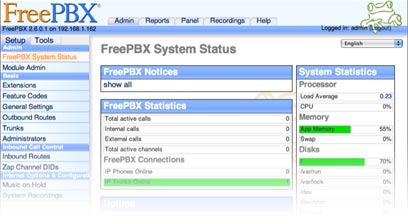
All the features of FreePBX® are fully supported.
The sound files are recorded to support all the features of FreePBX® right out of the box. These include voicemail, ivr, call queues, call transfers, call parking, conferences, torture menus, error messages, numbers, alphabet and phonetics.
You can download the recordings online and get up and running quickly. They are fully compatible with all the flavours of Linux that asterisk supports. The supported platforms are:
Conectiva: 9, Debian: i386 and PPC architectures, Fedora, Gentoo, Mandrake: 9.0, Redhat: 7.x, 8, 9, Redhat Enterprise Clones, CentOS, Pie Box, Tao Linux, Whitebox: i386 and AMD64, Slackware: 9.0, 9.1, 10.0 and 10.2, SuSE: Version 8, 9, 10.0 and 10.1, Trustix: Version 2.2, Yellow Dog: for PPC platforms only, YDL 3.01 works with Zaptel and LibPRI on PCI based Macintoshes, UltraLinux Sparc64: Gentoo/Sparc64, Gentoo (devfs+2.6 and udev+2.6), Debian, Fedora (2.6+udev), Slackware: 10.2 (install with 'test26.s' then install 2.6 kernel source and module packages from CD 2), SuSE 9.1 (2.6.4+udev), Redhat Enterprise Clones, CentOS, Mandrake: 10.x/LE2005/2006, FreeBSD, NetBSD: Runs solid on NetBSD 2.0, OpenBSD, Mac OS X, Solaris, Windows and Windows Cygwin
"You can hear the difference when a professional voice Artist answers the phone… instead of an employee who has ‘an OK’ voice.”
Each of the voice artists is a native speaker in their language so their voice and accent does not get in the way of your message.
The last thing you want is for your customers to think your American instead of listening to the ivr menu or voicemail.
The first impression you hear is the most important first impression your going to make.
...After all we can't make a Second first impression.




























Asterisk is the underlying technology that allows all the PBX functionality to work. Some of the features include Voice Menus, Call Queues, Follow me, Call transfers, Call Parking, Voice Mail, Transfers and of course phone calls. Asterisk provides you with all the neccessary tools to transform an ordinary computer into a powerful voice communications server. Learn more

Trixbox, formally known as asterisk@home, has become on of the most popular, easy to use, Asterisk installers. It will format a standard PC and turn it into a full Functioning Asterisk PBX. It also comes with a configuration program called FreePBX® as well as extra tools to make your life easier. A perfect solution for small and medium-sized businesses. Learn more
Elastix combines all of the top tools available for Asterisk-based PBXs into one easy-to-use interface. As well as having it's own utility set, Elastix allows for third-party module creation and offers extensive reporting capabilities. These features combined make it one of the best open-source PBX software packages available. Learn more

Asterisk is the underlying technology that allows all the PBX functionality to work. Some of the features include Voice Menus, Call Queues, Follow me, Call transfers, Call Parking, Voice Mail, Transfers and of course phone calls. Asterisk provides you with all the neccessary tools to transform an ordinary computer into a powerful voice communications server. Learn more

AsteriskNow is Digium’s auto installer and configuration platform that allows you to format a standard PC and turn it into a fully featured PBX. It installs Asterisk and included an editor for setting up the extensions, call groups, auto-attendant and everything else you need to get up and running quickly. Learn more
FreePBX® is the major open-source graphical user interface (Gui) for controlling and managing Asterisk once it’s installed. It has many great features and can be updated easily at the click of a button. It simplifies the process of configuring Asterisk by offering pre-programmed functionality through a user-friendly web interface. Learn more

A2Billing is a softswitch solution that extends the functionality of the Asterisk PBX. As well as providing converged services and self contained billing, A2billing can be configured to provide an impressive array of services. These include rate calls, preparing and sending out invoices, as well as accepting payments via a number of payment service providers. Learn more

Star2billing is the commercial equivilant of A2billing and is perfect for those that lack the knowledge to set up a VOIP telecom platform and softswitch solution themselves. Star2Billing provides a wide range of services, including commercial installation, support and consultancy on all A2Billing products, projects and services. Learn more